From 1 October 2026, changes to surcharging affect how you manage fees on invoices paid via Online Payments. More about the RBA surcharge changes
AMEX, eftpos, Mastercard and Visa have introduced no-surcharge rules in Australia following the RBA’s recent guideline updates.
What the RBA changes mean for you
If you use Online Payments, MYOB has removed the option to pass the payment fees on to your customers as a surcharge.
The surcharge has been automatically removed from new and existing invoices.
When a customer pays an invoice from 1 October 2026, they’ll pay the invoice amount only. The payment fee will be deducted from the amount deposited into your nominated bank account.
In summary
Until 30 September 2026: You could choose whether your business or your customer pays the online payment fee.
From 1 October 2026: Surcharging is turned off by default and MYOB has removed the option to pass the online payment fee on to your customers. Customers can continue to pay invoices online, but your business will pay the online payment fee.
Finding historical surcharge amounts
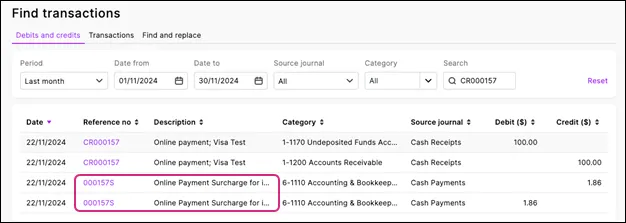
Use Find transactions to see your historical surcharge amounts.
Go to Banking and choose Find transactions.
Click the Debits and credits tab. A list of transactions appear.
The surcharge amount will have the same Reference no as the received payment, but with an additional 'S' at the end.

You can also see a breakdown of your online payments and fees, as well as get insights into your online payments, in your online payment reports.
Online company files only
AMEX, eftpos, Mastercard and Visa are introducing no-surcharge rules in Australia following the RBA’s recent guideline updates.
What the RBA changes mean for you
If you use Online Payments, MYOB has removed the option to pass the payment fee on to your customers as a surcharge.
The surcharge has been automatically removed from new and existing invoices.
When a customer pays an invoice from 1 October 2026, they’ll pay the invoice amount only. The payment fee will be deducted from the amount deposited into your nominated bank account.
In summary
Until 30 September 2026: You could choose whether your business or your customer pays the online payment fee.
From 1 October 2026: Surcharging has been turned off by default and MYOB has removed the option to pass the online payment fee on to your customers. Customers can continue to pay invoices online, but your business will pay the online payment fee.
Finding historical surcharge amounts
You'll see individual surcharge amounts in the Bank Register.
Go to the Sales command centre and click Transaction Journal.
Click the Disbursements tab. A list of transactions appear.
Choose your date range.
The surcharge amount will have the same ID No. as the received payment, but with an additional 'S' at the end.


You can also see a breakdown of your online payments and fees, as well as get insights into your online payments, in your online payment reports.