Your MYOB Partner Program tier gives you access to rewards on eligible MYOB Business subscriptions. Depending on your preference, you can receive your reward as either a discount or a commission.
-
From 1 June 2026, commission for subscription referrals will be applied as a monthly invoice credit to your MYOB practice account instead of being paid by bank deposit.
-
If your commission is more than what you owe MYOB, the remaining amount will be paid into your bank account.
Before you start
-
You must be the primary contact and a Practice Administrator to change your reward preference.
-
Keep your bank details up-to-date if you choose commission for your practice.
-
For more detail on how commissions and discounts work, see:
-
MYOB Partner Program Terms and Conditions Australia June 2026
-
MYOB Partner Program Terms and Conditions New Zealand June 2026
Access partner reward settings
On the left of Practice Compliance, click Practice (the stack of three boxes).

Compare status rewards
To see what status rewards you get at different Partner Program tiers, click Compare status rewards.

Your current reward preference
You can see your current reward preference in the Overview page of Partner Hub.

Choose your reward preferences
You can choose either a commission or a discount for the subscription payer.
You need to be the primary contact and the Practice Administrator.
On the left of Practice Compliance, click Practice (the stack of squares).
In the Your rewards section, click Change reward. You may need to scroll down to see this section.

On Your status rewards page, choose your reward preference:
Discounted MYOB subscriptions and click Save, or
Commission for your practice (ABN required). Enter your ABN, Account name, BSB and Account number and click Save.
From 1 June 2026, your commission is applied as a credit to your MYOB account to reduce the amount owning on your invoice. But these bank details are used if your commission is greater than the amount you owe MYOB. In this case we'll pay the difference into your bank account.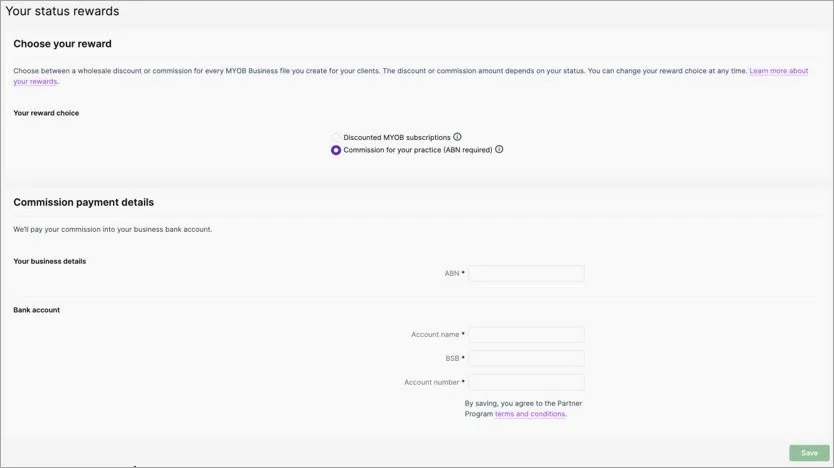
Next time you create an online file, you'll be able to choose if your practice or client will pay for the subscription. If you choose My Client – the cost of the software you refer to your client will show the relevant discount based on your Partner Program tier.
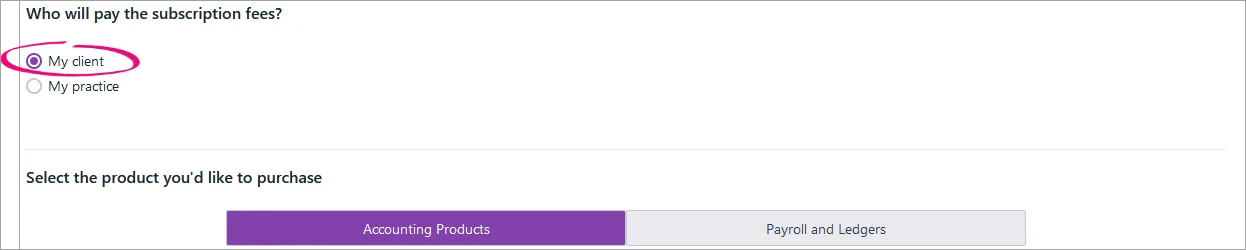
If your practice is paying for a client file subscription, you can change the payer from your practice to your client.


If we've reached out to you about rolling out a new experience, the option for the client to pay may be temporarily unavailable. Choose the option for your practice to pay or check back in a few weeks.
More partner settings
View more ways of working with the Partner Program.