To help your business automate its employment obligations following Payday Super coming into effect, you should authorise our onboarding company, Flare, to manage stapled super fund lookups as part of your employee self-onboarding.
What is super stapling?
Super stapling means an employee’s existing super fund ('stapled fund') follows them from job to job instead of a new account being created each time. This reduces duplicate accounts and excess fees, helping employees keep their retirement savings consolidated and easier to manage.
Lookups are mandatory
From 1 July 2026, a stapled fund lookup became a mandatory step during the Flare onboarding process. If a stapled fund is found, it must be presented to your employee alongside other available options during their fund selection.
Why use Flare for super fund lookups?
Builds stapling into employee self-onboarding. Choosing a fund happens in the normal onboarding flow reducing paper forms and chasing missing super details.
Automates stapled fund lookups via the ATO. Once Flare is authorised in Access Manager, the stapled fund lookup happens automatically in employee self-onboarding.
Prompts employees to review or accept their stapled fund. This saves you having to do the stapled fund lookup.
Stay compliant and reduce risk. Flare securely requests each employee’s existing fund from the ATO, helping you meet your obligations with confidence.
If you don't use Flare, you may have to rely on a more manual, error-prone process to look up super funds.
Set up super fund lookups
There are some one-time setup steps you need to do in ATO Access Manager to give Flare authorisation for super fund lookups.
Before you begin
You need to have these Access Manager sign-in details and permissions:
-
a Digital ID, such as myID
-
to be the Principal Authority or an Authorised Administrator within the ATO Relationship Access Manager (RAM) for the business.
If you don't have these permissions, check if someone else in the business does, like the business owner, finance team or payroll team.
Go to Access Manager and click Continue with Digital ID.
Click Select myID.
Enter your myID email and click Get code. Use the code to verify your identity on
the myID app.If you have access to multiple companies, select which company you'd like to
authorise for super stapling and click Continue.In the Access Manager menu > Business Appointments > Who has access to
my business, click Appoint new business.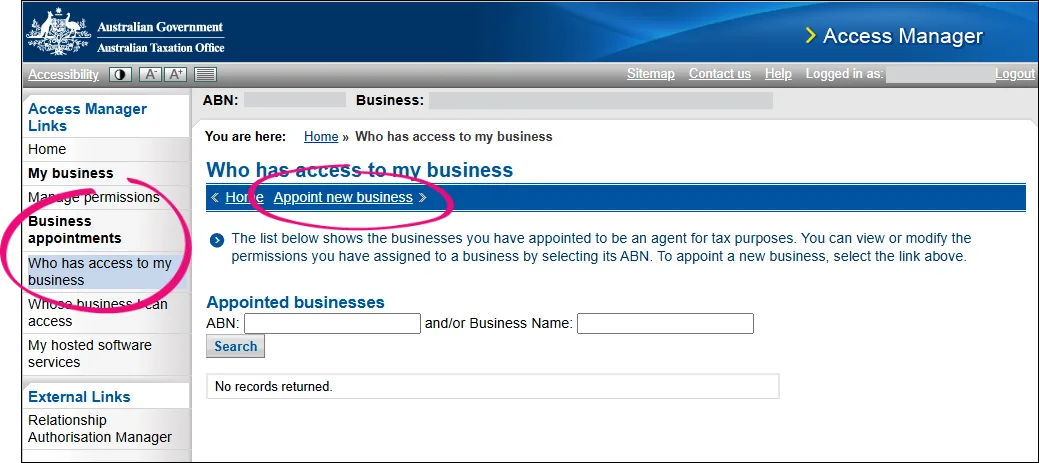
In the Enter ABN field, enter 46607120892 (or Flare HR Pty Ltd in the Business Name field) and click Continue.
Scroll down to Employee commencement form and select the options for View,
Prepare and Lodge.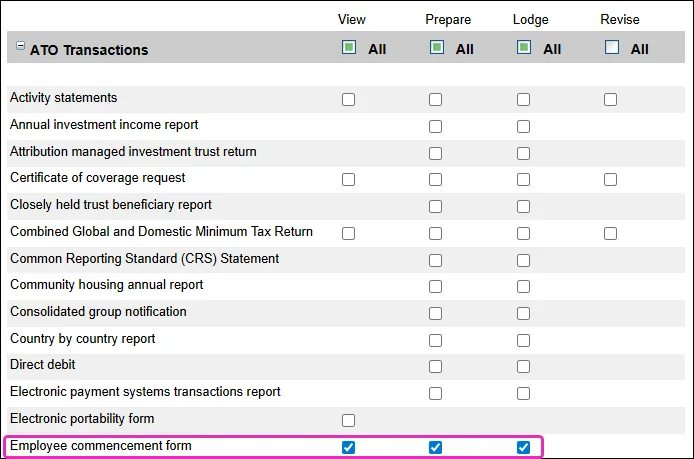
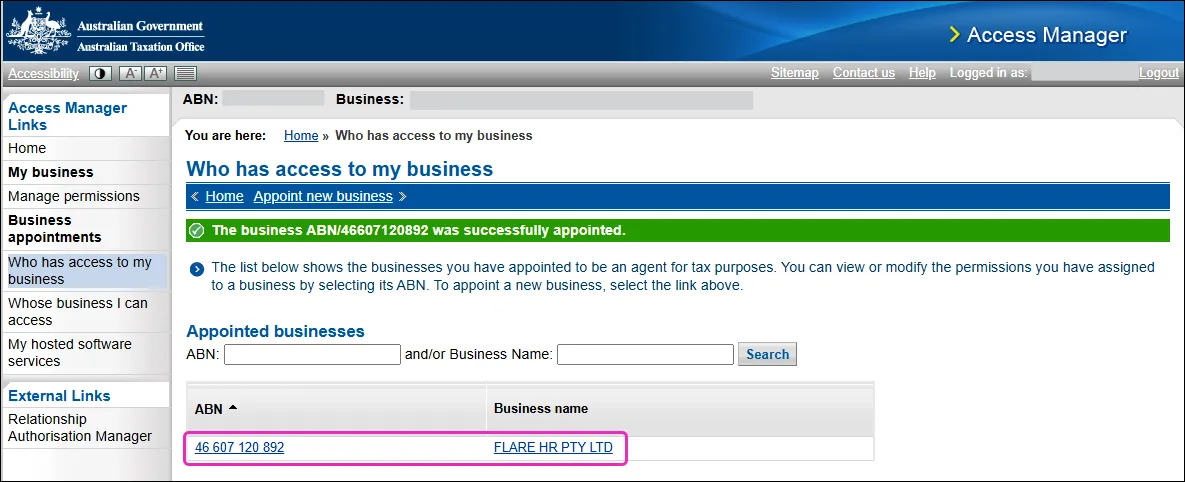
Click Save. FLARE HR PTY LTD is now listed as an appointed business authorised to perform stapled super fund lookups.


Stapled super is checked during employee self-onboarding
Once you've authorised Flare to do stapled super lookups, this happens when you use employee self-onboarding.
When you hire a new employee, send them a link to a secure form via email and SMS so they can submit their own personal, banking, tax and superannuation details straight into your MYOB business. This speed things up by getting the employee to submit their own details.
When they're prompted to complete their super details, Flare connects to the ATO’s stapled fund lookup service. If the ATO returns a stapled fund, it's shown before any other funds for the employee to select.
Once the employee has submitted their details, all you need to do is enter some payroll info into their employee record.
More about employee self-onboarding
Who is Flare?
Flare is an MYOB company providing workplace solutions to Australian businesses and their employees. Flare self-onboarding and employee benefits features are available to MYOB Business and AccountRight desktop users.
Learn more about the Flare employee self-onboarding and benefits platform available as part of your MYOB subscription on the Flare website.
Information and privacy
Information collected by using the Self-onboarding and Employee Benefits services are treated in accordance to the MYOB Group privacy disclosure statement and Flare privacy policy.
FAQs
What is super stapling?
Super stapling means an employee’s existing super fund ('stapled fund') follows them from job to job instead of a new account being created each time. This reduces duplicate accounts and excess fees, helping employees keep their retirement savings consolidated and easier to manage.
What changed on 1 July 2026?
If your customers advertise super funds during onboarding, they must attempt a stapled fund lookup and, where a stapled fund exists, show it alongside any other fund options. Flare is adding stapled fund lookups into onboarding, so these flows remain compliant with the new Payday Super legislation.
Who must complete Employer Authorisation?
Only the Principal Authority or an Authorised Administrator within the ATO Relationship Access Manager for the business can complete Employer Authorisation.
My Access Manager login isn’t working, who can help?
If you receive an error when attempting to log in to ATO Access Manager, it will be because you don't have the required authorisations. You can log in to the Resource Authorisation Manager (RAM) to view your privileges – the roles you require are Principal Authority or Authorisation Administrator. You'll also need Full level of access to the Australian Tax Office (ATO).
If you need further help with this, contact the ATO.
What happens if I don’t authorise Flare?
If Flare is not authorised, stapled fund lookups cannot be performed for that business during employee self-onboarding and your business will need to complete the stapled lookup manually.
I don't have a myID, how can I get one?
If you don't have a myID, you won't have access to ATO Access Manager (AM), or Resource Authorisation Manager (RAM). You should speak to the business owner, finance team or payroll team and determine who has a MyGovID, and access to these portals. Once you have determined who has access, provide these instructions for them to complete.
What if I can't find Flare by ABN or Name?
This happens if you're using the wrong search field. Click Appoint new business in the blue banner on the screen to see the correct search field:

Then, search for Flare HR Pty Ltd, or by our ABN: 46607120892.
I received a letter from the ATO titled 'Your stapled super fund request outcomes' — do I need to do anything?
When you use Flare’s super onboarding, Flare sends stapled super requests to the ATO and then passes the ATO outcome codes to your HR/payroll platform as a letter.
The ATO letter is just a summary for your records (outcome numbers plus a table of employees and funds). It doesn’t mean that onboarding has failed and you usually don’t need to redo anything – just file the letter and contact your payroll provider or Flare support if the fund details don’t match what you see in payroll.