If you need help from our team and don’t have time to call in or speak with us over live chat, you can submit a support request in My Account and one of our friendly team will get back to you.
We’re rolling out a new support request experience. You may notice some differences if we haven't reached out to let you know you’ve been moved to the new experience.
Submit a support request in My Account
Go to My Account and make sure the correct account is selected on the top right. You may first be prompted to sign in using your MYOB account email address and password.
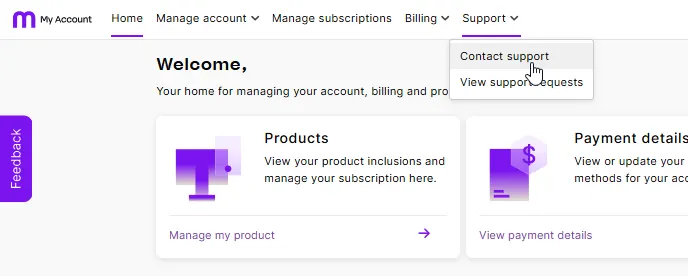
Go to the Support menu and choose Contact support.
Complete the details in the Contact support page.
You can't upload images when creating a support request. However, after receiving your first response from our team, you’ll be able to attach images to your response emails.Don't share your MYOB password or payment information. Our support team will never ask for this information over live chat or email.
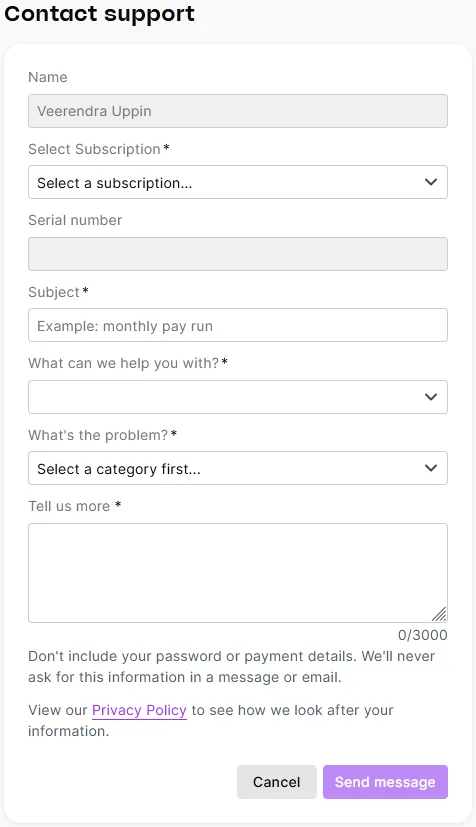
When you’re finished, click Send message.
Having trouble submitting a support request? Contact us for assistance.


Updating a support request
You'll receive an email reply to your submitted support requests. You can reply to the email if you need to update your request.
Viewing the status of your support request
You can view your support requests and their status (New, In progress, Resolved) at the bottom of the My Account home page:
