Users are now able to tag Jobs, making managing and tracking of Jobs a whole lot easier.

Each Project Board can be setup differently for Tagging.

Access the Tags tab under the Board Maintenance to setup new tags, or to allow custom tagging.
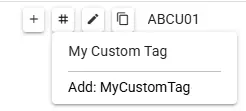
Allow Custom Tags will allow tags to be created on the fly when adding tags to a Job. This means if the tag does not exist when typing, the User will have the option to immediately create the Tag and assign it to the Job. Once added, the Tag colour can be changed from the Board Maintenance later.
If custom tags are not used, Tags can be added by typing in the “Add Tag…” and selecting the desired tag colour. This will mean that tags need to be added before being available to assign to a Job, however, this will allow the list of available tags to be more controlled and specific if required.

Once Jobs have been tagged, the Filters can be used to find jobs matching the required tags. Multiple Tags can be applied to Jobs and Multiple Tags can be used for filtering.
