You can reverse bills from past periods if they’re unallocated.
To check if a receipt is allocated, select the Processing menu and choose Edit invoices.
To check if you can deallocate allocations, select the Processing menu and choose Receipts.
Reverse a bill
Select the Processing menu and choose Billings.
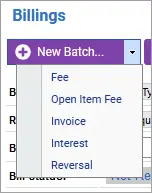
Hover over the New Batch button, select the drop-down icon and choose Reversal.
Complete the New Reversal Item fields and save your changes.
