Last updated 3 June 2026
Each month we release improvements, new features and bug fixes to MYOB Business. You'll also notice these changes if you use AccountRight in a web browser. If you use AccountRight desktop software, see what's new.
See what's new without leaving MYOB Business
Click the help icon and look for the What's new link at the bottom of the help panel.
What we released in May
Open Banking
Open Banking bank feeds are now available for all customers and all participating institutions (Australia only)
Open Banking is now available for all MYOB customers when connecting to banks that support Open Banking. Open Banking gets your bank connected in minutes and gives you access to a greater range of institutions and account types. Powered by government-regulated CDR standards, so your financial data moves securely and seamlessly between your bank and MYOB.
Smart Reconciliation
Smart Reconciliation is now the default banking experience
Smart Reconciliation is now the default way you'll work with bank transactions. This gives you a clearer user interface and method labels so you'll know how your transactions have been matched. You can also accept multiple suggestions at once.

You still have the option to adjust your auto-matching settings, for example turning off AI auto-matching to categories.
Guidance on reconciliation
A refreshed Reconcile view helps you to get your reconciliation finalised. Unmatched transactions are highlighted with suggestions on how to fix them before finalising reconciliation.

More about finalising your reconciliation
Easier to change category matches
You can now change the category on a matched transaction (in the Matched view) without first needing to undo the match.
Improvement to auto-matching of bills and invoices
Bank transactions will now only automatch to an open invoice or open bill if the bank description contains an invoice or bill number or contact name, and the date and amount of the bank transaction fit the invoice or bill.
Performance improvement for copying category matches
If you use the Shift + keyboard shortcut in the Match column to quickly copy a previous categorisation to another bank transaction, you'll find this now works faster.
User access invitations
Resend invitation improvements
You can now resend a user access invitation when the user has the status Cancelled, Expired, or Access removed. If they accept the invitation, they become an active user again.

If you're a File user or Online admin, you can also change the user type of the person you're re-inviting (for example, from File user to Online admin, or vice versa).

More about resending invitations
Security
You can now set up multiple passkeys
Passkeys are a phishing-resistant way to sign in to all MYOB software and services without entering your email address and password. You can have up to 5 passkeys for your MYOB account. This means that you’ll have a backup if one device isn’t available (for example, if you leave your phone at home, but have another passkey on your office computer).
Payroll
See STP and super payment status at a glance (Australia only)
You can now see the status of your STP submissions and super payments in past pay runs. It's available in the past pay runs list and in each pay run's details, making it easier to stay on top of your Payday Super obligations.

MYOB Assist mobile app
Australia only
We're continuing to enhance MYOB Assist, the companion app for MYOB Business.
Control user access with the new Field role
Now you can give any employee access to MYOB Assist — without worrying about who sees what. The new Field role lets you extend the app to frontline, field, and operational staff, so they can get the help they need without gaining access to your financial reports, sensitive business data, or browser and desktop features.

Bug fixes
The category list now appears immediately when you search for a category for a transaction on the Bank transactions page.
Previous releases
To learn about changes to MYOB Business in previous releases, see MYOB Business release history.
AccountRight 2026.4.1.13 - released 28 May
This patch fixes an issue that could cause AccountRight to crash after users are logged in for some time.
AccountRight 2026.4.1.9 - released 25 May
This patch fixes an issue that prevented some users from signing in to AccountRight. This issue only impacted IT-managed devices where the user wasn't an administrator on the device.
Each month, we release improvements, new features, and bug fixes. If your company file is online, you can also use AccountRight in a web browser – take a look at what's new in the browser.
What's new in AccountRight version 2026.4 - released 13 May
Sales
Attachments come across when a sales order is converted to an invoice
When you convert a sales order to an invoice, all attachments from the sales order are automatically carried over to the invoice, so you no longer need to reattach them.

Single sign on is being re-released
From 21 May 2026, we're re-releasing single sign-on, shaped by customer feedback. When you open a company file, you can stay connected across desktop and browser with fewer stops at the login screen.
Here's how it works:
Signing in for AccountRight desktop opens your default browser.
You only need to sign in once to move between desktop and browser.
Your email address is prefilled on login screens.
Single sign-on works with your preferred password manager.
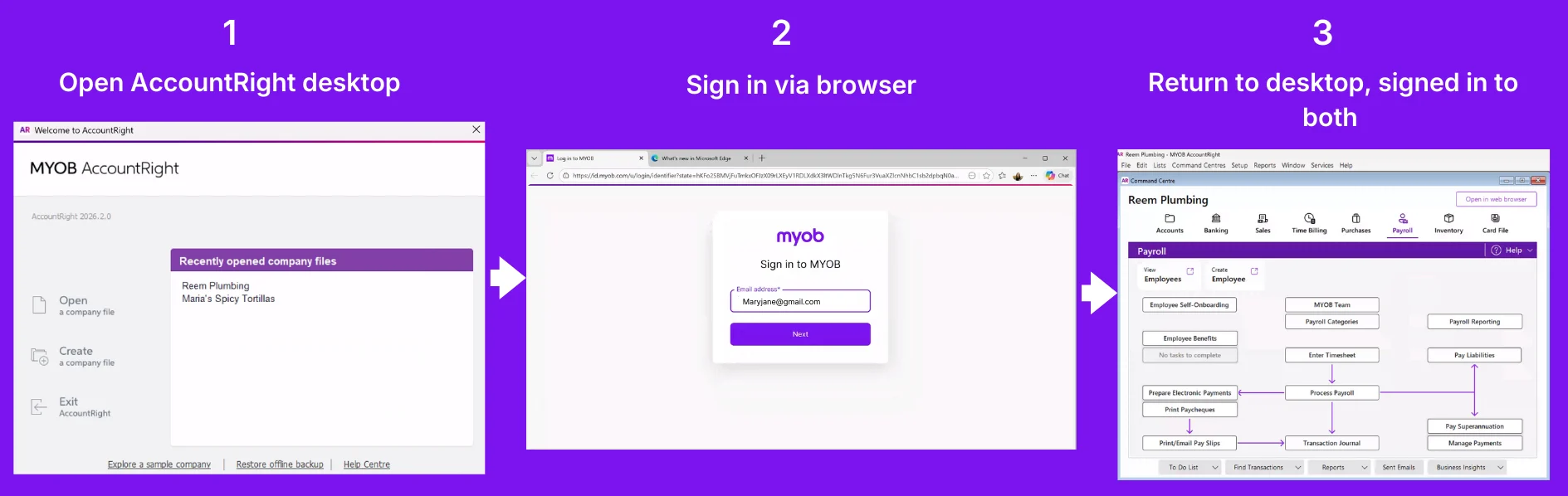
Simultaneous logins across multiple files are only supported when using the same user ID.

Payroll
Employee self-onboarding and super (Australia only)
By default, the Superannuation Guarantee category is now selected in the Payroll Details tab of an employee card created via employee self-onboarding.

Coming soon
Currently in Beta. Only available when Online Payments is turned on.
Say goodbye to sending multiple invoices for jobs requiring more than one payment. With Payment Schedules, you can request a deposit or split payments into instalments, all within the one invoice.From 17 June 2026, working offline will no longer be supported. If you work offline, we recommend you to put your company file online before 17 June. This ensures your data is protected with automatic online backups, and you get live bank feeds, multiuser access, and the latest updates.
After each release, we retire an older version
We usually release an AccountRight update around the middle of the month with improvements and fixes.
As updates are released, older versions are decommissioned and no longer work online. If you're using an older version and your file's online, you must update to the latest AccountRight version to keep working.
If you're using AccountRight version 2026.3, you must update by 26 May*.
Shut down AccountRight when you're not using it. If you leave AccountRight open all the time, you may miss out on automatic updates.
* All dates are indicative only and subject to change.
How to get this update
If you use AccountRight PC Edition (version 2021.1 or later) or AccountRight Server Edition (version 2022.4 or later) you'll automatically be updated to the latest release of AccountRight. The next time you log in after that, you'll be prompted to restart AccountRight to complete the update.
If you use AccountRight Server Edition version 2022.3 or earlier you can download the latest version for your server (AccountRight subscription required). Learn more about updating an AccountRight network.
Not sure what edition you're using? If you can see SE in the desktop shortcut description, you're using Server Edition. Otherwise, you're probably using the PC Edition.

If you see a message that AccountRight needs updating when you open AccountRight, you need to restart AccountRight to install any pending updates. See Getting the latest version.
Previous releases
To learn about changes to AccountRight in previous releases, see the release history.