Last updated 3 June 2026
Each month we release improvements, new features and bug fixes to MYOB Business. You'll also notice these changes if you use AccountRight in a web browser. If you use AccountRight desktop software, see what's new.
See what's new without leaving MYOB Business
Click the help icon and look for the What's new link at the bottom of the help panel.
What we released in May
Open Banking
Open Banking bank feeds are now available for all customers and all participating institutions (Australia only)
Open Banking is now available for all MYOB customers when connecting to banks that support Open Banking. Open Banking gets your bank connected in minutes and gives you access to a greater range of institutions and account types. Powered by government-regulated CDR standards, so your financial data moves securely and seamlessly between your bank and MYOB.
Smart Reconciliation
We're rolling out Smart Reconciliation as the default banking experience
Smart Reconciliation will soon be the default way you'll work with bank transactions. This gives you a clearer user interface and method labels so you'll know how your transactions have been matched. You can also accept multiple suggestions at once.

You still have the option to adjust your auto-matching settings, for example turning off AI auto-matching to categories.
Guidance on reconciliation
As part of the Phase 2 release of Smart Reconciliation, there is a refreshed Reconcile view that helps you to get your reconciliation finalised. Unmatched transactions are highlighted with suggestions on how to fix them before finalising reconciliation.

More about finalising your reconciliation
Easier to change category matches
You can now change the category on a matched transaction (in the Matched view) without first needing to undo the match.
Improvement to auto-matching of bills and invoices
Bank transactions will now only automatch to an open invoice or open bill if the bank description contains an invoice or bill number or contact name, and the date and amount of the bank transaction fit the invoice or bill.
Performance improvement for copying category matches
If you use the Shift + keyboard shortcut in the Match column to quickly copy a previous categorisation to another bank transaction, you'll find this now works faster.
User access invitations
Resend invitation improvements
You can now resend a user access invitation when the user has the status Cancelled, Expired, or Access removed. If they accept the invitation, they become an active user again.

If you're a File user or Online admin, you can also change the user type of the person you're re-inviting (for example, from File user to Online admin, or vice versa).

More about resending invitations
Security
You can now set up multiple passkeys
Passkeys are a phishing-resistant way to sign in to all MYOB software and services without entering your email address and password. You can have up to 5 passkeys for your MYOB account. This means that you’ll have a backup if one device isn’t available (for example, if you leave your phone at home, but have another passkey on your office computer).
Payroll
See STP and super payment status at a glance (Australia only)
You can now see the status of your STP submissions and super payments in past pay runs. It's available in the past pay runs list and in each pay run's details, making it easier to stay on top of your Payday Super obligations.

MYOB Assist mobile app
Australia only
We're continuing to enhance MYOB Assist, the companion app for MYOB Business.
Control user access with the new Field role
Now you can give any employee access to MYOB Assist — without worrying about who sees what. The new Field role lets you extend the app to frontline, field, and operational staff, so they can get the help they need without gaining access to your financial reports, sensitive business data, or browser and desktop features.

Bug fixes
The category list now appears immediately when you search for a category for a transaction on the Bank transactions page.
Previous releases
To learn about changes to MYOB Business in previous releases, see MYOB Business release history.
Each month, we release improvements, new features, and bug fixes. If your company file is online, you can also use AccountRight in a web browser – take a look at what's new in the browser.
What's new in AccountRight version 2026.5 - available 17 June*
Payroll
Helping you stay compliant for the 26/27 payroll year (Australia only)
We've got you covered this EOFY by taking care of all these changes for the 2026/27 payroll year:
Payday Super is coming 1 July 2026 – and AccountRight has you covered
Payday Super is the ATO's new requirement to pay super on payday, and it starts on 1 July 2026. If you use Pay Super to pay your super from AccountRight, you're ready for Payday Super.
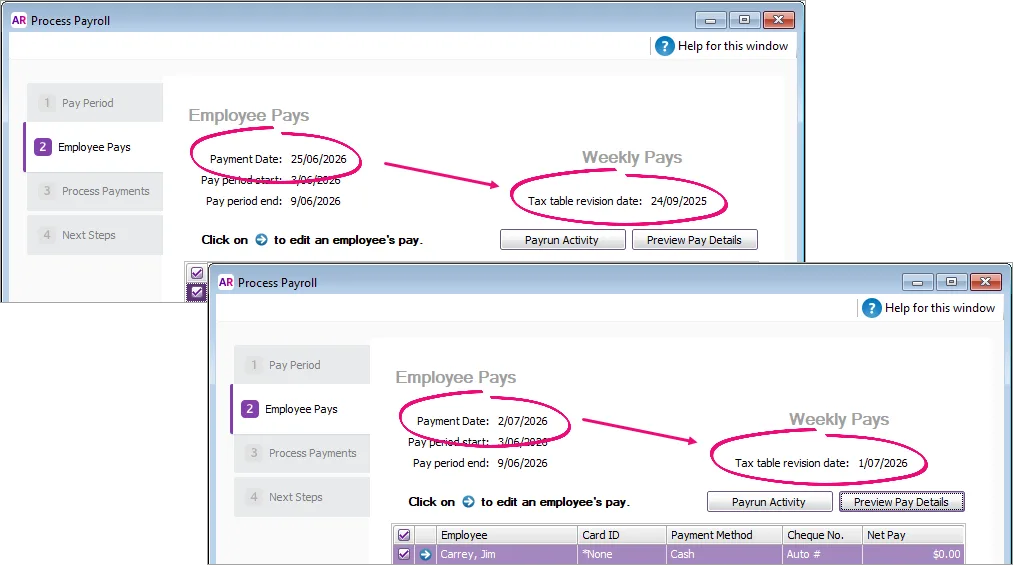
More about Payday SuperTax tables – the 2026/27 tax tables have been automatically updated and will apply for pays dated 1 July 2026 onwards. You'll see the new tax table date when you do a pay dated 1 July or later. Pays dated 30 June or earlier will still use the 25/26 tax tables.

Working offline end of support
From 17 June 2026:
AccountRight PC Edition becomes online only and will no longer support offline company files. Online files will continue to work in PC Edition or a web browser. If you have an offline file, you'll need to move it online to keep working.
AccountRight Server Edition becomes offline only and will no longer support online company files. If you're hosting a file on a local network, you'll need Server Edition installed on every workstation that accesses it. This means you might need to update your network.
Payment schedules are available
One invoice, from first payment to final balance (Australia only)
Payment Schedules is an online payments feature that lets businesses take an invoice deposit or split the total into instalments – all on one invoice. No more sending multiple invoices for jobs requiring more than one payment.

Open Banking
Open Banking bank feeds are now available for all customers and all participating institutions (Australia only)
Open Banking is now available for all MYOB customers when connecting to banks that support Open Banking. Open Banking gets your bank connected in minutes and gives you access to a greater range of institutions and account types. Powered by government-regulated CDR standards, so your financial data moves securely and seamlessly between your bank and MYOB.
Smart Reconciliation
AccountRight browser only
We're rolling out Smart Reconciliation as the default banking experience
Smart Reconciliation will soon be the default way you'll work with bank transactions in AccountRight browser. This gives you a clearer user interface and method labels so you'll know how your transactions have been matched. You can also accept multiple suggestions at once.
You still have the option to adjust your auto-matching settings, for example turning off AI auto-matching to categories.

It's easier to see withdrawals and deposits
You now have the ability to split the Amount column into separate Withdrawal and Deposit columns:
Guidance on reconciliation
As part of the Phase 2 release of Smart Reconciliation, there is a refreshed Reconcile view that helps you to get your reconciliation finalised. Unmatched transactions are highlighted with suggestions on how to fix them before finalising reconciliation.
More about finalising your reconciliation
Security
You can now set up multiple passkeys
Passkeys are a phishing-resistant way to sign in to all MYOB software and services without entering your email address and password. You can have up to 5 passkeys for your MYOB account. This means that you’ll have a backup if one device isn’t available (for example, if you leave your phone at home, but have another passkey on your office computer).
MYOB Assist mobile app
Australia only
We're continuing to enhance MYOB Assist, the companion app for MYOB Business.
Give access to the MYOB Assist app - but not your books
If you want to give someone access to the MYOB Assist app, but not to your AccountRight company file, assign them the Field role. This role is designed for staff who need to work in the app without access to sensitive business information. It's suited to staff who work away from the office and need to create quotes, send invoices or capture receipts in the app.

After each release, we retire an older version
We usually release an AccountRight update around the middle of the month with improvements and fixes.
As updates are released, older versions are decommissioned and no longer work online. If you're using an older version and your file's online, you must update to the latest AccountRight version to keep working.
With the release of MYOB AccountRight 2026.5, PC Edition customers using the 2026.4 version of MYOB AccountRight must update their software by 29th June 2026* to continue accessing their online company file. AccountRight 2026.5 Server Edition customers will only access offline files.
Shut down AccountRight when you're not using it. If you leave AccountRight open all the time, you may miss out on automatic updates.
* All dates are indicative only and subject to change.
How to get this update
If you use AccountRight PC Edition, you'll automatically be updated to the latest release. The next time you log in after that, you'll be prompted to restart AccountRight to complete the update.
If you see a message that AccountRight needs updating when you open AccountRight, you need to restart AccountRight to install any pending updates. See Getting the latest version.
Previous releases
To learn about changes to AccountRight in previous releases, see the release history.