If you need to, you can undo the last reconciliation you completed.
If you need to undo multiple reconciliations, or a reconciliation that you completed earlier than the last one, you can keep undoing the most recent reconciliation until you reach the one you need to undo.
Need to undo a single reconciled transaction?
If it was auto-reconciled via bank feeds or an imported bank statement, you'll need to unmatch the transaction. If the transaction was manually reconciled, you'll need to undo the reconciliation it belongs to - see the steps below.
To undo a reconciliation
From the Banking menu choose Reconcile accounts.
If you only want to show reconciliations you've completed on a particular bank account, choose it from the Bank account dropdown list.
Click Undo.
At the confirmation message, click Yes, undo reconciliation.
Undoing an auto-reconciled transaction
If a transaction has been incorrectly auto-reconciled, you can unmatch it. Go to the Banking menu > Bank transactions, then click the unmatch icon in the Match or categorise column for that transaction (you need to hover your mouse over the transaction in the Match or categorise column for the icon to appear).
You can then match it correctly.
Learn more about matching and unmatching transactions.
If you have reconciled a transaction in error or deleted a previously reconciled transaction, you can undo the previous account reconciliation. When you undo a reconciliation, all transactions for that period return to an unreconciled status.
If the error was made in a reconciliation earlier than your last reconciliation, you can undo several reconciliation periods in succession in your current financial year.
When you undo an account reconciliation, you will need to reconcile each transaction again and reprint your reconciliation reports.
To undo a bank reconciliation
Go to the Banking command centre and click Reconcile Accounts. The Reconcile Accounts window appears.
In the Account field, enter the account for which you want to undo the reconciliation.
Click Undo Reconciliation.
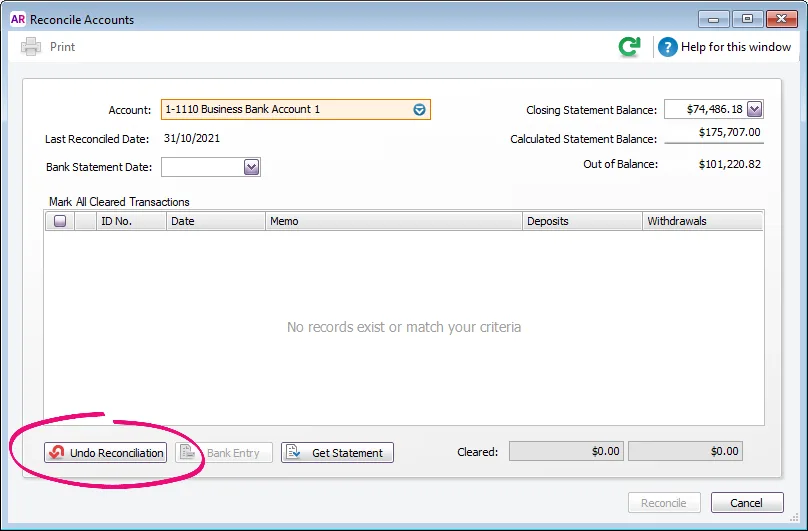
Undo Reconciliation button greyed out? That's because the account has never been reconciled. Try choosing a different Account.
The Undo Last Reconciliation window appears, confirming the account and date of the reconciliation you are undoing.
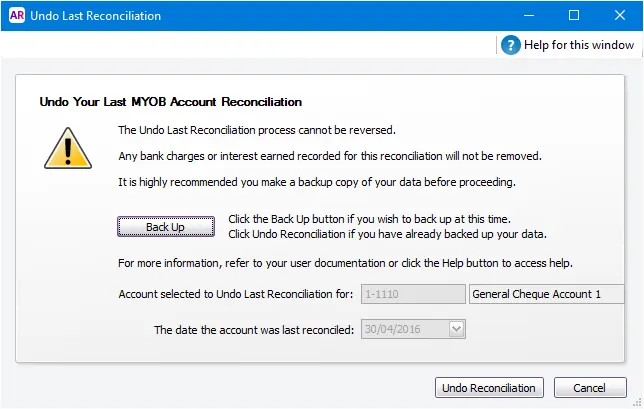
Undoing a bank reconciliation can't be reversed, so it's strongly suggested you click Back Up to create a backup before proceeding.
Click Undo Reconciliation. A confirmation window appears.
Click OK. The Reconcile Accounts window reappears.

