If you have more than one 2FA method enabled, you can reset the authenticator app or SMS 2FA method in My Account. Doing this is like removing that 2FA method then setting it up again.
You can only reset a 2FA method if you have more than one 2FA method set up or you have a recovery code.
You might need to reset a 2FA method to:
change the phone number your SMS 2FA codes are sent to
re-link your authenticator app to MYOB
change authenticator apps
set up an authenticator app on a new phone
Log into My Account (myaccount.myob.com).
If prompted, choose a 2FA method to verify your account and enter the 2FA code.
Click your user name in the top-right corner and choose Account security.
Click the ellipsis (...) button for Authenticator app or SMS and choose Reset.
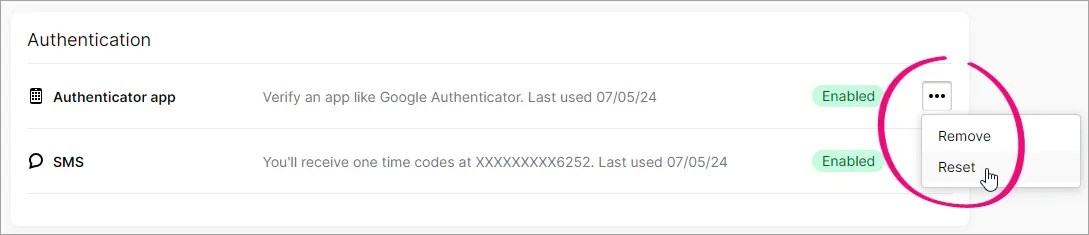
At the confirmation, click Reset again.
Choose one of your other methods to receive a 2FA code or use a recovery code to verify your identity.
Follow the prompts to set up authenticator app or SMS 2FA again.
